


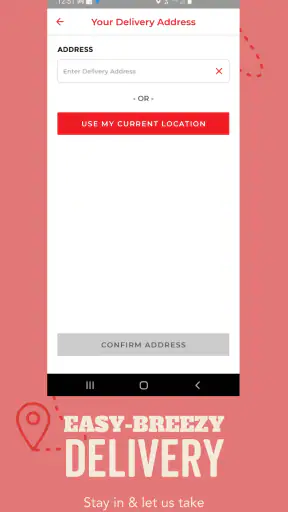
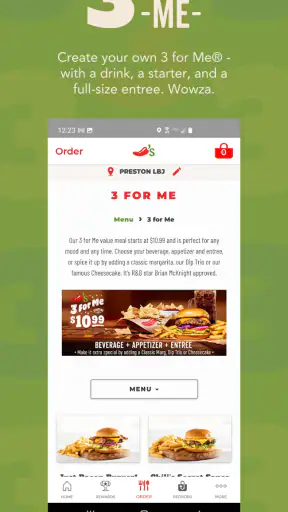
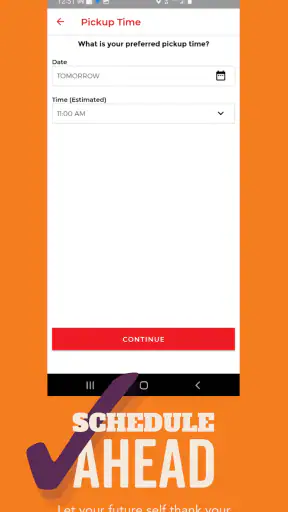

When I want Chili’s without turning dinner into a long planning session, I use Chilis as a practical starting point. This free lifestyle app from Brinker International brings restaurant search, menu browsing, and pickup or delivery ordering into one place. I would not describe it as a complete food-planning tool or a replacement for every delivery service, but it is useful when I already know I want Chili’s and want to move from “what should we eat?” to a confirmed order with as little back-and-forth as possible.
My experience with it is strongest when I treat the app as a restaurant-specific ordering tool rather than a general dining discovery app. That distinction matters. If I am comparing several nearby restaurants, checking broad cuisine options, or hunting for the cheapest delivery route, a general map or delivery platform may be more convenient. If I want to see what a Chili’s location offers, choose between pickup and delivery, and place the order directly through the restaurant’s app, this is the more focused option.
How I use Chilis from the first search to the finished order
The basic workflow is easy to understand. I start by finding a Chili’s restaurant, then browse the available menu and decide whether pickup or delivery makes more sense. The useful part is that these steps belong to the same experience. I do not have to search for a location in one tool, inspect a separate menu somewhere else, and then begin ordering from scratch in another place.
For a normal weekday meal, I first choose the restaurant that makes sense for my destination rather than automatically picking the closest one. The nearest location is not always the most convenient if I am already driving home, meeting friends, or sending food to another address. Taking a moment to check the selected location before browsing deeply helps prevent the common mistake of building an order for the wrong restaurant.
Menu browsing is more useful when I approach it with a plan. I usually decide whether I want a full meal, something to share, or a smaller order before I start tapping through choices. That keeps me from repeatedly opening items and changing direction. It also makes the app feel quicker, because I am using it to make a decision rather than expecting it to make the decision for me.
When I choose pickup, the app fits a particularly simple routine: place the order before leaving, then collect it on the way. This works well for someone commuting home or coordinating dinner around a short break. Delivery is more convenient when nobody wants to drive, but I prefer to review the selected address and order details carefully before submitting. A restaurant app can make the ordering flow straightforward, yet the cost of correcting a wrong location or an incomplete order is still higher than spending a few extra seconds checking.
One everyday example is a family deciding on dinner after work. I can search for the relevant restaurant, let each person look at the menu, and keep the order in one place instead of passing a phone around while someone else searches a browser. For a group, I find it helpful to settle the main choices first and customize only what genuinely matters. Otherwise, the ordering screen can become a slow conversation about every possible adjustment.
The app is also useful for a less obvious situation: ordering for someone else. If a friend or family member is at home while I am out, delivery can remove the need for them to coordinate a pickup. In that case, I treat the delivery details as the most important part of the process and confirm the recipient’s address before spending time on menu choices. This habit sounds basic, but it avoids wasting effort on an order that cannot arrive where intended.
What I check before I place an order
I do not assume that the menu I see is interchangeable across every restaurant. I pay attention to the selected location and the ordering method, because the practical choices available to me can depend on those details. Even when the app makes the process look like one continuous menu, I still review the final basket rather than relying on memory.
My final check covers the restaurant, the items, customizations, quantity, and whether I selected pickup or delivery. I also reread the destination when ordering delivery. This is not glamorous advice, but it is one of the most valuable habits with any restaurant-ordering app: the fastest order is the one that does not need to be corrected.
I also avoid building a complicated order while distracted. If I am ordering during a commute, I wait until I can safely focus on the screen. The app is designed for convenience, not for making phone use safe in situations where attention belongs elsewhere. A few minutes saved at the start are not worth an avoidable mistake.
Settings and habits that make the experience smoother
There are not many settings I need to adjust before using Chilis, which is part of its appeal. I prefer checking the practical choices that affect an order instead of searching for elaborate controls. The most important “setting” in my routine is the ordering context: which restaurant I am using, whether I want pickup or delivery, and where the food should go.
I keep my location decision deliberate. If I am picking up food, I choose the branch that fits my route, not merely the one that appears first. If I am ordering delivery, I think about the destination first. This small change makes the app more useful for real life, where the best restaurant is often the one that fits the evening’s schedule rather than the one with the shortest distance on a map.
I also recommend checking the app’s current version before judging performance. The version listed for Chilis is 9.1.4, and the app supports devices running Android 7.0 or later. That makes it accessible on many older Android phones, but an older operating system can still behave differently from a current device. If the app feels slow or displays oddly, I would first make sure the phone and app are up to date before assuming the ordering service itself is the problem.
Because the app is rated for Everyone, it is approachable for a household where different people may help choose dinner. That does not remove the need for an adult to review delivery details, payment choices, and the final order when appropriate. The age label tells me the app is broadly suitable; it does not replace sensible supervision of a purchase.
Another habit I use is separating browsing from ordering. I may look through the menu when I am only deciding what sounds good, then return later when I am ready to choose a restaurant and order. This prevents an idle browsing session from turning into an accidental purchase and gives me time to compare choices calmly. It is especially helpful when I am ordering for several people with different preferences.
I do not expect the app to act like a saved meal planner. Its value is in the immediate restaurant task. If I need a recurring grocery list, nutrition tracking, broad restaurant comparison, or a record of meals across different chains, I would use another tool alongside it. Chilis works best when the goal remains close to “find this restaurant, choose from its menu, and arrange this meal.”
Shortcuts I use for repeat orders
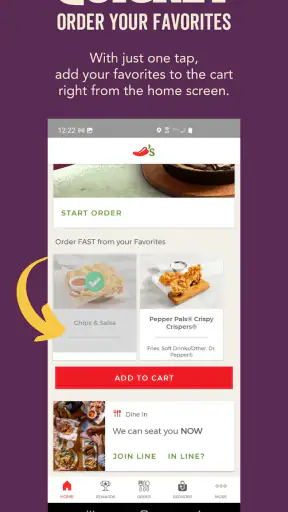
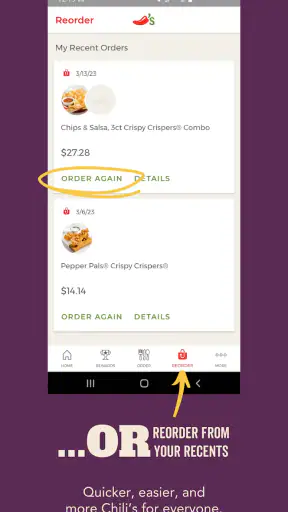
Experienced use is less about secret buttons and more about repeating a reliable sequence. I begin with the likely restaurant, choose the service type early, and keep the order focused. Once I know what my household usually wants, I can move through the menu with less hesitation. That is faster than opening every category simply because it is available.
For pickup, I prepare the order before I leave home and use the travel time to finish other tasks. For delivery, I confirm the recipient and destination before discussing extras. These two patterns look similar on the screen, but they solve different problems: pickup is mainly about timing and route, while delivery is mainly about accuracy and coordination.
When ordering for a group, I find that assigning one person to collect choices and another to confirm the basket can reduce confusion. The app itself does not need a special group mode for this to work. We simply use a repeatable household process: agree on the restaurant, gather each person’s item, review quantities, and submit only after everyone has had a chance to check.
I also use the menu as a conversation aid rather than passing around vague descriptions. Showing the available choices helps friends or family make a decision without asking me to recite everything. This is a small but real advantage over ordering by phone, where the person placing the order has to translate the menu verbally and may miss an important detail.
For a quick solo meal, I skip unnecessary customization unless it affects what I actually want to eat. Every additional choice creates another opportunity to overlook the final total, quantity, or preparation detail. My rule is simple: customize with purpose, then reread the complete order once. That gives me control without turning a straightforward meal into a long editing exercise.
Where the app is strong, and where its limits show
The clearest strength is focus. Chilis is not trying to be a universal marketplace. It is built around the experience of using Chili’s restaurants, which means the menu and ordering path feel more relevant than they would inside a broad platform that mixes many restaurants together. For an existing Chili’s customer, that focus can make the decision process calmer and more direct.
The app also avoids the awkwardness of switching between restaurant information and ordering. I can find a location, inspect choices, and continue toward pickup or delivery in one restaurant-branded environment. That is particularly useful when I already have a specific chain in mind and do not need a long list of unrelated alternatives.
Its limitations come from the same focus. If I am undecided about where to eat, the app gives me only one restaurant family to consider. A general delivery service is better for comparing nearby restaurants, delivery availability, and different cuisines in one search. A map app may also be better when my main question is simply which locations are closest to a particular destination.
I would also skip Chilis when my priority is broad price comparison. A restaurant-specific app can be convenient, but convenience and the lowest possible cost are not always the same thing. If I want to compare service charges, delivery arrangements, or promotions across several options, I would check the alternatives before committing. I would not install this app solely for restaurant discovery unless Chili’s is already a regular choice.
Another trade-off is that a focused ordering app may encourage me to decide too quickly because the path from menu to basket is so direct. I counter that by checking the restaurant and order details before submission. The app helps me execute a decision; it does not necessarily help me decide whether that restaurant is the best fit for the evening.
The audience size suggests that this is not a niche experiment. Chilis has passed five million installs, with an average rating of 4.3 from roughly forty-three thousand ratings and about thirteen thousand written reviews. I read that as evidence of a well-established everyday tool, not proof that every user will have the same experience. Restaurant ordering depends on location, timing, device performance, and the accuracy of the choices entered.
The app is free, which makes trying it low-risk for someone who already visits Chili’s. Still, “free” describes access to the app, not the overall cost of a meal. I keep the restaurant order itself separate from the question of whether the app is worth installing. For occasional customers, a mobile browser or another service may be enough. For repeat customers, the dedicated app is easier to justify because it puts the relevant restaurant workflow in one place.
Brinker International is clearly identified as the developer, and the app has been available since December 15, 2011. That long presence gives me confidence that this is an established product rather than a temporary ordering experiment. At the same time, a long-running app still needs to feel comfortable on a current phone, so I judge it by the clarity of the present ordering flow rather than by its age alone.
Who should use it and who should choose something else
I recommend Chilis to people who regularly eat at Chili’s, households that often arrange pickup, and anyone who prefers a restaurant-specific menu instead of browsing a crowded marketplace. It is also a sensible choice for someone who wants to send a meal to another person and would rather manage the order through the restaurant’s own app.
I would be more cautious about recommending it to someone who rarely visits Chili’s, has limited phone storage, or wants one app for every restaurant. In those cases, a browser or an existing delivery platform may create less clutter. People with older devices should also pay attention to the Android requirement and how comfortably the app runs on their particular phone.
For accessibility and convenience, I value the fact that the app keeps the task concentrated. But anyone who finds small-screen menu navigation tiring may prefer a larger browser display or a computer when planning a large group order. The right choice depends less on loyalty to an app and more on how much food, customization, and coordination the order involves.
My verdict after making it part of a repeatable routine
Chilis succeeds because it keeps a specific job clear: help me locate a Chili’s restaurant, understand the available menu, and arrange pickup or delivery. I find it most satisfying when I already know the restaurant I want and use a short checklist to avoid mistakes. The app saves time through focus, not through an endless collection of features.
My best workflow is to choose the location first, decide between pickup and delivery, browse with a meal plan in mind, and review the completed basket before submitting. For groups, I gather choices before opening the final order. For delivery, I confirm the destination before customizing extras. These habits are simple, but they make the difference between a smooth order and a frustrating correction.
I would not make it my only food app. General delivery services and map tools remain better for comparing restaurants, exploring unfamiliar areas, or weighing several options at once. Chilis is the better specialist: less flexible as a discovery tool, but more direct when the destination is already clear.
Overall, I think it is worth trying if Chili’s is part of your normal dining routine. The free price removes the main barrier, the Everyone rating makes it approachable for a broad household, and the established app supports a straightforward restaurant workflow. My recommendation is conditional but positive: use it when you want Chili’s specifically, and choose a broader service when your real goal is comparing the whole neighborhood.


